
There are two structural reasons. The first is that an EC2 instance is billed by the hour whether it’s running at 5% or 95% of its capacity. A m5.xlarge left running in a pre-production environment clocks 730 hours per month (roughly $150 that produces nothing). The second is that compute evolves faster than habits: AWS releases a new generation every 12–18 months with a better price-to-performance ratio, yet Launch Templates, Terraform modules, and Ansible playbooks keep referencing whichever generation the team started with. Three years later, you’re still running m5 when m7i is the current standard.
The audit is essentially about fixing these two patterns. Not redesigning the architecture, not changing the application model. Just aligning what’s running with what’s actually needed, and running it on the right generation.
This is the first thing we look at, because it’s the least painful. AWS publishes a new instance generation every 12–18 months with a better price-to-performance ratio than the previous one, and keeps selling the older generations at the same price as before. In practice, a workload still running on m5.large instances in 2025 is paying the same price as in 2019 for noticeably lower performance. Switching to m7i gives roughly 15% better performance at the same cost, or the same performance at a lower cost, depending on how you size it. For ARM64-compatible workloads (meaning most modern applications that don’t depend on an x86 binary), moving to m7g (Graviton) adds around 20% discount on top of m7i.
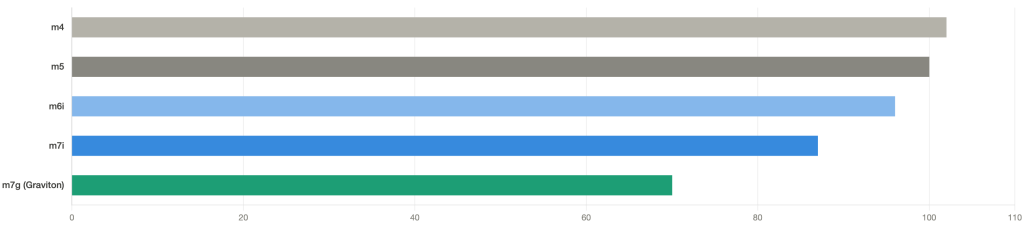
Detection is straightforward: list instances by family via Cost Explorer or the CLI, cross-reference with the current-generation matrix by region, and identify the gap. Execution depends on context. For ASGs with a versioned Launch Template, it’s a template update followed by a rolling refresh: a few minutes per group. For standalone instances, it’s a stop-change-start within the usual maintenance window. For Graviton, add a pre-production validation step, because ARM64 compatibility can’t be assumed, even though it’s now the norm for most workloads.
Compute Optimizer is probably the most underused AWS service relative to the value it delivers. Enabled for free at the Organizations level, it analyzes 14 days of CloudWatch metrics for each instance and generates a rightsizing recommendation, classified by risk level (Low, Medium, High). The service is right there, the recommendations are ready, yet most accounts we audit have never opened the Compute Optimizer console.
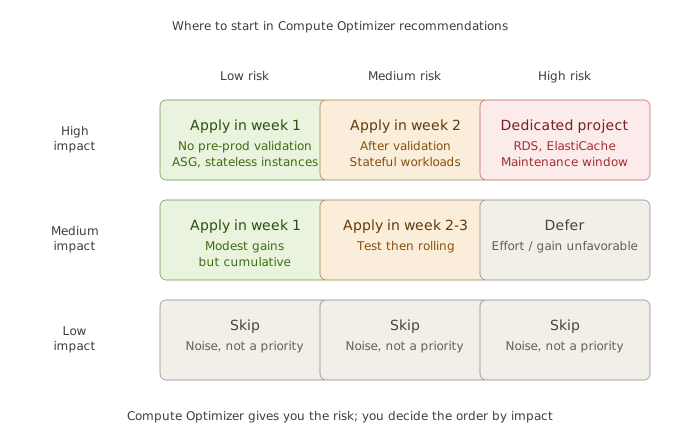
The common mistake is applying everything at once, which creates unnecessary risk. The right approach is sequenced: all Low risk stateless instances (web servers, APIs, workers) go first, in a single batch. Low risk on stateful resources (RDS, ElastiCache) waits for pre-production validation. Medium risk is deferred to the second week after validation. Anything High risk requires understanding why before touching it, and usually becomes its own project rather than a quick win.
The cumulative effect of Low risk stateless recommendations typically delivers 8–15% savings on the affected compute, within a week of execution.
Savings Plans are the most powerful cost lever AWS offers, and also the most often mishandled. Three patterns keep coming up: no commitment at all on a workload that’s been stable for two years; a commitment subscribed without any prior modeling; and a Savings Plan that expired without renewal. All three are expensive mistakes, for different reasons.
The right approach is the same in all three cases: model before you commit. In Cost Explorer, go to the Savings Plans recommendations view, set the analysis period to 7 days, select Compute Savings Plan (the most flexible of the three), 1-year term with No Upfront payment. Review the recommended coverage percentage, compare it against the current bill, and verify that the stable baseline over the past 12 months (the portion of the bill that never drops below a certain threshold) covers the proposed commitment.
The rule we follow on engagements: commit to 70% of the stable baseline, no more. That’s conservative, but it protects against unexpected decreases (serverless migration, rightsizing post-audit, loss of a client). The Compute Savings Plan delivers 27% discount on the committed portion, so even at 70% coverage it’s well worth it, and the buffer prevents over-commitment on workloads that might shrink.
An idle instance is an instance that someone provisioned and forgot. It keeps running, keeps billing, and serves no active purpose. On accounts we audit regularly, we find between 5 and 20% of EC2 instances that fall into this category: development environments, migration staging areas, or PoC machines from a project that wrapped up six months ago.
Detection relies on CloudWatch: pull average CPU utilization for all instances over 30 days and filter on anything below 5%. Cross-reference with the tagging map (if it exists) to identify owners. Then proceed in two passes: stop instances before deleting them. A stopped instance still has its volumes billed, but stopping first gives the team a buffer to raise a hand if something was actually being used for a legitimate but infrequent purpose (monthly rendering, end-of-quarter processing).
A pre-production instance running 24/7 when it’s only used during working hours is paying roughly 4.5x too much. That’s 168 hours billed per week against 40 hours of actual use. Yet on nearly every account we audit, dev, staging, and pre-prod environments run continuously, out of habit.
AWS Instance Scheduler, deployable in a few minutes via a CloudFormation stack, solves this cleanly. Create a schedule (business hours 8am–7pm, Monday–Friday), tag the relevant instances with Schedule=business-hours, and the scheduler stops and restarts them automatically. Same principle for pre-prod RDS. For ASGs, use native Scheduled Actions.
Typical savings on a pre-production environment shifted from 24/7 to 11h × 5 days/week: around 70% of the compute cost for those instances. Across a fleet of 30–50 non-prod instances, that’s usually several hundred dollars per month recovered at near-zero implementation effort.
One pitfall to watch for: some teams work non-standard hours or in different time zones. Before pushing a restrictive schedule, document an on-demand restart procedure (a simple start-instances with confirmation), so legitimate use cases aren’t blocked.