
Compute waste announces itself: an idle instance shows up in monitoring, a flat CPU graph is hard to miss once you look. Storage waste does the opposite. A detached EBS volume keeps the exact same line item on the bill as an attached one. A snapshot from a deleted AMI looks identical to a snapshot you still need. An S3 bucket full of logs from 2022 costs the same per GB whether anyone reads them or not. There is no signal that anything is wrong, which is precisely why it accumulates.
The audit work here is mostly archaeology. You go through the storage layer resource by resource, cross-reference what is actually attached, accessed, or referenced, and separate the live data from the dead weight. None of it is glamorous. All of it pays.
This is the first thing we look at, because it is the closest thing to free money AWS offers. gp3 volumes deliver the same baseline performance as gp2 (3,000 IOPS and 125 MB/s included) at 20% lower cost per GB ($0.08 vs $0.10 per GB-month), with the added benefit of being able to provision IOPS and throughput independently of size. There is no performance trade-off and, for volumes under 1 TiB, gp3 is actually faster out of the box.
The migration happens online via modify-volume, with no detach and no reboot. The application keeps running throughout. Detection is a one-liner: aws ec2 describe-volumes --filters Name=volume-type,Values=gp2. On a mature account we routinely find that 60% to 90% of general-purpose volumes are still on gp2, simply because they were created before gp3 existed and nobody went back.
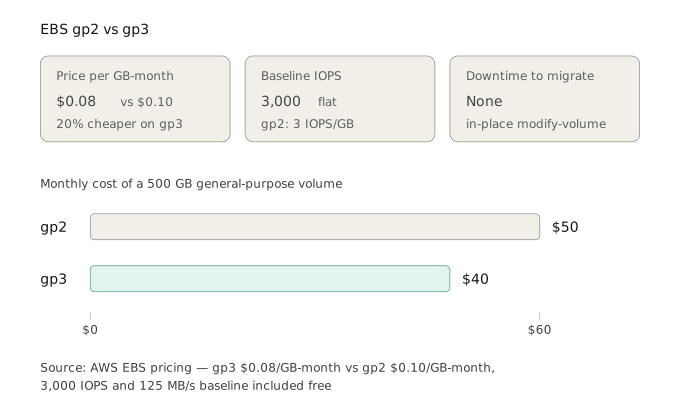
The only caveat: gp2 on volumes above 1 TiB gets more than 3,000 baseline IOPS (3 IOPS/GB), so before migrating a large volume, check its actual IOPS usage in CloudWatch and provision matching gp3 IOPS if needed. Even with paid extra IOPS, gp3 almost always comes out cheaper. For the vast majority of volumes, it is a straight 20% cut with zero downside.
Orphaned storage is the dead weight of past projects. Three targets account for almost all of it. First, detached EBS volumes in available state: a volume that outlived its terminated instance keeps billing at full rate. Second, orphaned snapshots: snapshots whose source AMI has been deregistered, or manual snapshots taken “just in case” years ago. Third, unused AMIs and their backing snapshots, which quietly hold storage long after the image stopped being deployed.
Detection runs through the CLI: describe-volumes filtered on State=available, describe-snapshots --owner-ids self cross-referenced against active AMIs, and describe-images --owners self against running instances. On a mature account, the three combined frequently add up to several hundred euros per month of pure waste.
The action is never blind deletion. Detached volumes get snapshotted before deletion (a cheap insurance against “we actually needed that”). Snapshots get checked against any AMI that still references them. This discipline costs a little time and avoids the one catastrophic mistake that makes everyone afraid of cleanup in the first place.
S3 is where the largest storage savings usually hide, and where they are most often left on the table. The reason is structural: applications write to a bucket in S3 Standard and never think about it again. But most data has a clear access lifecycle, hot for the first weeks, then progressively colder. Logs, backups, analytics exports, and archived user content are almost always written once and read rarely after the first month.
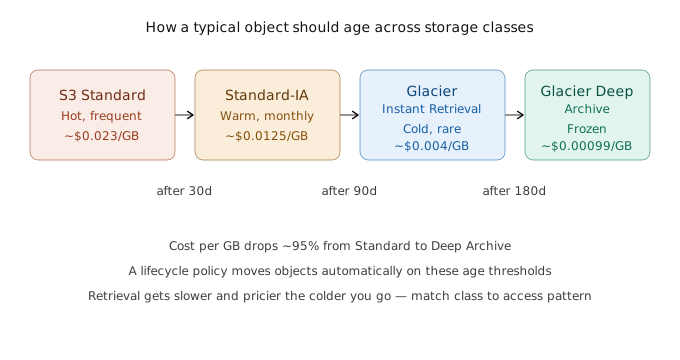
A lifecycle policy moves objects automatically across storage classes based on age. The cost difference is dramatic: Standard-IA is roughly 45% cheaper than Standard, Glacier Instant Retrieval around 80% cheaper, and Glacier Deep Archive over 95% cheaper, all while keeping the data immediately or near-immediately retrievable depending on the class. For buckets where the access pattern is genuinely unpredictable, S3 Intelligent-Tiering handles the transitions automatically for a small monitoring fee.
CloudWatch log groups created without an explicit retentionInDays setting keep their logs forever, at $0.03 per GB-month after ingestion. On an account with a few hundred verbose log groups, that accumulation routinely passes the terabyte mark, none of which anyone will ever query past the first month.
Detection is direct: aws logs describe-log-groups --query 'logGroups[?retentionInDays==null]'. The fix is one command per group, setting retention to match the actual business need — 30 days for pre-production, 90 or 365 for production depending on compliance requirements. The saving is modest in absolute terms (a few hundred euros a month on a large account) but the effort is near zero, and it stops the bleed permanently rather than just draining it once.
RDS storage has two common forms of waste. The first is over-provisioned storage: a database allocated 1 TB of gp2 at creation “to be safe”, now using 200 GB and never growing. Unlike EC2, RDS storage cannot shrink in place, so this one is identified for a planned migration rather than treated as an instant quick win — but flagging it matters. The second, easier form is manual snapshot sprawl: hundreds of manual DB snapshots accumulated over years, plus automated backups with retention windows far longer than the business actually requires.
Detection: describe-db-instances for allocated vs used storage, and describe-db-snapshots --snapshot-type manual for the snapshot count. Deleting redundant manual snapshots and aligning automated backup retention to the real recovery requirement (often 7 days instead of an accidental 35) is a same-week action with no production impact. Migrating RDS storage from gp2 to gp3 applies here too, with the same 20% logic as for EBS.
This is the one that takes a small amount of architectural thought, but it is so common it earns its place in the list. Plenty of applications serve static assets — images, PDFs, user uploads, exports, build artifacts — straight off the EBS volume attached to an EC2 instance. As that content grows, the volume is resized upward, and you end up paying premium block-storage prices for what is effectively a file archive. gp3 at $0.08/GB-month is roughly 3.5 times the cost of S3 Standard, and an order of magnitude more than colder S3 classes.
The fix is to move static assets to an S3 bucket and serve them from there, optionally fronted by CloudFront for caching and lower egress. The application change is usually small (swap a local filesystem path for an S3 URL or presigned link), and the payoff is double: the EBS volume shrinks back to what the OS and application actually need, and the static content lands on storage that is both cheaper and infinitely scalable. On content-heavy applications, this single move can cut the per-instance storage footprint by more than half.